WordPress has, with version 5.0, completely redesigned the editor. The new “block-style” editor is supposed to be “instantly understandable,” and allow for much greater flexibility. This change was, as with most major WordPress changes, made unilaterally, without any consideration for what users actually asked for or wanted. Plugins were made available for users who hadn’t yet upgraded to try the new editor, or for those who had updated to revert to the old editor, and the ratings provide a pretty clear picture of what actual users think.
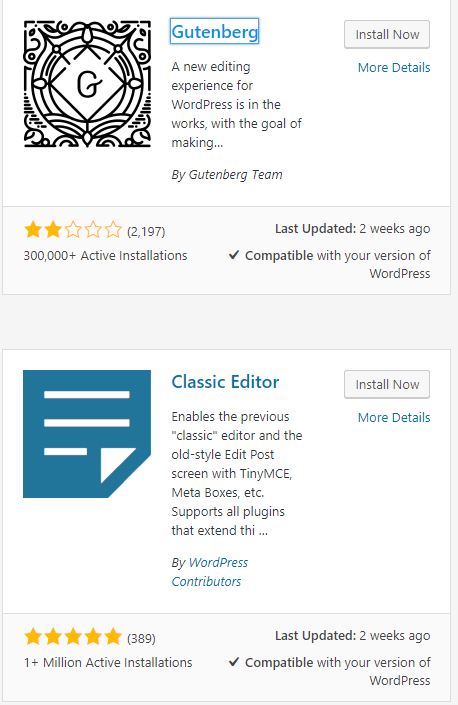
There’s pretty widespread distaste for the new editor — at least as a forced integration (rather than an optional setting) — and, as per usual, complaints from the support staff/volunteers that “we don’t like it” isn’t feedback. In the interest of getting more widespread visibility, I’m copying below the review that I left.
About WordPress’s Gutenberg Editor
First of all, to the “support volunteers” who have complained that “it’s bad” is not feedback, I beg to differ. “We just simply don’t like it” absolutely is feedback. It may not be feedback you like. It may not tell you how to tweak it to fix something. That’s because we don’t want you to “tweak it to fix it”; we want you to make it GO AWAY because we didn’t ask for it, didn’t want it, don’t like it, and don’t believe it fulfilled all its fancy promises. (I don’t actually think it’s a bad thing to have this available as a plugin, but I think it’s horrible as the new interface.)
But if “I don’t like it; it isn’t actually intuitive” is too confusing and non-specific for you (ironically, since we users are expected to just magically know what the developers had in mind with what they threw at us), let me provide some examples of exactly how this is confusing. (I have, by the way, been using WordPress for over a decade and, although I’m not a programmer, have done a little bit of tweaking behind-the-scenes, so I don’t consider myself a newbie or a beginner or un-tech-savvy.)
First of all, with one single update, the entire interface just instantly changes, with no explanations of what anything is changing to. Not only does the actual editor itself change, but so do all of the setting options in the sidebar. The terminology is different, a whole different set of options are available, etc. So now I have to figure out all over again how to schedule a post or save a draft. It used to be intuitively obvious that I was changing the date — but not publishing a post — or switching between draft and publish modes — but not actually publishing the post — or actually clicking the button to save the post according to whichever date and setting I’d chosen.
It’s no longer intuitive to even save a post. I don’t know what to click on to make a post go live, much less to save it in draft format. I guess that maybe I need to click on “immediately,” except I’m afraid to click that link because I have no idea what will happen. It isn’t a drop-down, so I don’t know if clicking it will give me options or if clicking will publish the post — immediately. Likewise, I don’t know what will happen if I click on “public.” Being an experienced user, and knowing what the drop-downs looked like before, I can guess that it’s possible that clicking public will give me options like “password-protected” and that clicking “immediately” might give me options to set a different date. But I have no earthly idea what to click on if what I actually want to do is save the current draft, as a draft. If I hadn’t used WP before, I would have no reason to even guess that clicking these might provide options, and I would assume that clicking “immediately” will publish the post and clicking “public” might let me save it as a draft or make it private.
In other words, the simplest aspect of publishing a post — which was, previously, fairly intuitive — has now become utterly confusing. And I haven’t even tried to type anything yet.
So let’s do that, shall we? Oh, wait. I don’t know how. Where it was previously intuitive to add a title and body text — and largely intuitive for any word processor user (read: pretty much any computer user) to add basic formatting like headings, bold, italics, images, etc. — now literally the only thing that’s obvious to me is how to enter a title. There’s a title field and I’m told I can “start writing or type/to choose a block.” Intuitively, I would assume that means in the field I’m in.
As some poking around indicates, that seems not to be the case. (And that instruction doesn’t even make sense. Type to choose a block?!) It really means to start typing or click where that text is written to insert data for the post. Where it wasn’t actually intuitive that text was interactive in the first place. But if, after poking around, I determine that’s the case, I can type but I remain confused. Because now I can type plain text, and that’s all I can intuitively figure out. The sidebar gives me an option to change the text size based on sizes I’ve never seen before, but I have no clue how those “sizes” related to anything on a live site. I don’t want “sizes”; I want headings, which provide an actual hierarchy to the coding of my page, but I have no idea how or where to find that option anymore.
And if I want to add something else, it’s even more confusing. If I want another type of block, I don’t know it. I don’t know what types of blocks do what. If I choose an image block, I don’t know where it’s going to show up. I no longer know how to align it with the remainder of the text. I don’t know how to add a link. I certainly can’t figure out how to add a clip of code (that I want to actually function as code). Whereas I could do ALL OF THESE THINGSpreviously in a very intuitive manner.
Now, I can probably figure out most of these things with enough time invested. That isn’t the point. The point of this is not to ask you to tell me “how to add a heading,” for instance. The point is this interface is not intuitive at all. It isn’t user-friendly. It isn’t simple. It’s complicated and confusing. WordPress’s team told us to “Imagine…Users who can instantly understand and use WordPress,” and this utterly fails at that. Experienced users can’t even understand and use this WordPress without a good deal of time invested in the learning curve. The idea of understanding it “instantly” is a joke, and I wouldn’t recommend this to any newbie.
Maybe for once the WP team should consider actually asking users what we want, instead of just steamrolling us into doing what the programmers want.

This post hits the nail squarely on the head. And it is written by an experienced WP user! I am by no means an experienced user, and have found WordPress to be almost entirely NOT intuitive, even before the 5.0 update. In fact, I would say WP is the most onerous application I have ever worked with. My company’s website is built on it, so I must work with it, otherwise there is nothing that would make me do so. I also work with a non-profit that currently has a Squarespace site. SO much easier to work with, and has all of the function we look for in a site, even e-commerce.
After updating WP and experiencing the Gutenberg block editor, I tried to update a page of our site and ended up deleting all of its content. Thankfully, I always back up. I immediately installed the Classic Editor plug-in, and hope to never use the block editor again. It is exactly as Rachel has described. Good luck everyone!